| Windows Terminal | |
|---|---|
 | |
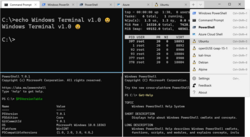 Windows Terminal running on Windows 10 | |
| Other names | Windows Terminal |
| Developer | Microsoft |
| Initial release | 3 May 2019 (2019-05-03)1 |
| Stable release | 1.24.11321
/ May 13, 2026 (2026-05-13)2 |
| Preview release | 1.25.1322
/ May 13, 2026 (2026-05-13)3 |
| Written in | C++ |
| Operating system | |
| Platform | IA-32, x86-64, ARM64 |
| Type | Terminal emulator |
| License | MIT License |
| Website | aka |
| Repository | github |
Windows Terminal is a multi-tabbed terminal emulator developed by Microsoft for Windows 10 and later4 as a replacement for Windows Console.5 It can run any command-line app in a separate tab. It is preconfigured to run Command Prompt, PowerShell, Windows Subsystem for Linux and Azure Cloud Shell Connector,67 and can also connect to SSH by manually configuring a profile.8 Windows Terminal comes with its own rendering back-end; starting with version 1.11 on Windows 11, command-line apps can run using this newer back-end instead of the old Windows Console.9
Since Windows 11 22H2 and Windows Terminal 1.15, Windows Terminal replaces Windows Console as the default.1011
History
Windows Terminal was announced5 at Microsoft's Build 2019 developer conference in May 201912 as a modern alternative for Windows Console, and Windows Terminal's source code first appeared on GitHub on May 3, 2019.1 The first preview release was version 0.2, which appeared on July 10, 2019.13 The first stable version of the project (version 1.0) was on May 19, 2020, at which point, Microsoft started releasing preview versions as the Windows Terminal Preview app, which could be installed side-by-side with the stable version.14
Features
Terminal is a command-line front-end. It can run multiple command-line apps, including text-based shells in a multi-tabbed window. It has out-of-the-box support for Command Prompt, PowerShell, and Bash on Windows Subsystem for Linux (WSL).6 It can natively connect to Azure Cloud Shell.7
Terminal augments the text-based command experience by providing support for:
- Notebook tabs, to hold multiple instances in a single window
- ANSI VT sequence support
- UTF-8 and UTF-16 (including CJK ideograms and emojis)a
- Hardware-accelerated text rendering via DirectWrite
- Modern font and font feature support (see below)
- 24-bit color
- Window transparency effects
- Themes, background images and tab color settings15
- Different window modes (e.g. fullscreen mode, focus mode, always on top mode)
- Split panes
- Command palette15
- Jump list support15
- Microsoft Narrator compatibility via a User Interface Automation (UIA) tree16
- Support for embedded hyperlinks15
- Copying text to clipboard in HTML and RTF format
- Mouse input
- Customizable key bindings
- Incremental search
- Terminal shortcut17
- Sixel support18
Cascadia Code
Cascadia Code is a purpose-built monospaced font by Aaron Bell of Saja Typeworks for the new command-line interface. It includes programming ligatures and was designed to enhance the look and feel of Windows Terminal, terminal applications and text editors such as Visual Studio and Visual Studio Code.19 The font is open-source under the SIL Open Font License and available on GitHub.20 It is bundled with Windows Terminal since version 0.5.2762.0.21
Notes
Notes
- Requires an appropriate font to be selected for rendering
References
References
- Howett, Dustin L (May 3, 2019). "v0.1.1002.0: Initial release of the Windows Terminal source code". microsoft / terminal repo. Microsoft – via GitHub.
- Howett, Dustin (May 13, 2026). "Windows Terminal v1.24.11321.0". GitHub. Retrieved May 15, 2026.
- Howett, Dustin (May 13, 2026). "Windows Terminal Preview v1.25.1322.0". GitHub. Retrieved May 15, 2026.
- Warren, Tom (May 6, 2019). "Microsoft unveils Windows Terminal, a new command line app for Windows". The Verge.
- Cinnamon, Kayla (May 6, 2019). "Introducing Windows Terminal". Microsoft Corporation. Retrieved November 20, 2020.
- Bright, Peter (May 6, 2019). "Coming soon: Windows Terminal—finally a tabbed, emoji-capable Windows command-line". Ars Technica.
- Bhojwani, Pankaj (August 2, 2019). "The Azure Cloud Shell Connector in Windows Terminal". Windows Command Line. Microsoft – via DevBlogs.
- nguyen-dows (September 28, 2023). "Windows Terminal SSH". learn.microsoft.com. Retrieved December 28, 2023.
- "Windows Terminal v1.11.2921.0". Microsoft / terminal repo. Microsoft. October 20, 2021 – via GitHub.
- "Windows Terminal is now the Default in Windows 11". October 18, 2022.
- "Command Prompt and Windows Powershell for Windows 11".
- Warren, Tom (May 6, 2019). "Microsoft unveils Windows Terminal, a new command line app for Windows". The Verge. Vox Media. Retrieved November 20, 2020.
- Howett, Dustin L (July 10, 2019). "Windows Terminal - Preview v0.2". microsoft / terminal repo. Microsoft – via GitHub.
- Howett, Dustin L (May 19, 2020). "Windows Terminal v1.0.1401.0". microsoft / terminal repo. Microsoft – via GitHub.
- "Windows Terminal Preview 1.4 brings embedded hyperlinks support, version 1.3 generally available - Neowin". Neowin. September 23, 2020.
- Microsoft Issues Major Update to Windows Terminal – Thurrott.com
- "Windows Terminal Shortcut". Archived from the original on March 2, 2024.
- "Add support for Sixel images in conhost by j4james · Pull Request #17421 · microsoft/terminal". GitHub. Retrieved September 12, 2024.
- Cascadia Code | Windows Command Line Tools For Developers
- GitHub - microsoft/cascadia-code
- "Release Windows Terminal Preview v0.5.2762.0 · microsoft/terminal · GitHub". GitHub Windows Terminal repository. October 4, 2019.
Further reading
Further reading
- Fuqua, Will (2021). Windows Terminal Tips, Tricks, and Productivity Hacks: Optimize your command-line usage and development processes with pro-level techniques. Packt Publishing. ISBN 978-1800207561.