| time | |
|---|---|
 The ReactOS time command | |
| Operating system | RT-11, VERSAdos, iRMX 86, MS-DOS, PC DOS, MSX-DOS, DR-DOS, PC-MOS, SpartaDOS X, OS/2, eComStation, ArcaOS, Windows, ROM-DOS, SISNE plus, PTS-DOS, FreeDOS, ReactOS, SymbOS, DexOS |
| Platform | Cross-platform |
| Type | Command |
| License | PC-MOS: GPL-3.0-only ReactOS: GPL-2.0-only |
In computing, TIME is a command in DEC RT-11,1 DOS, IBM OS/2,2 Microsoft Windows3 and a number of other operating systems that is used to display and set the current system time.4 It is included in command-line interpreters (shells) such as COMMAND.COM, cmd.exe, 4DOS, 4OS2 and 4NT.
Implementations
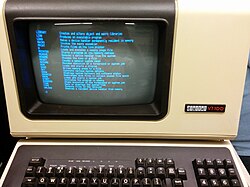
TIME command of RT-11SJ displayed on a VT100. source ↗The command is also available in the Motorola VERSAdos,5 Intel iRMX 86,6 PC-MOS,7 SpartaDOS X,8 ReactOS,9 SymbOS, and DexOS operating systems as well as in the EFI shell.10 On MS-DOS, the command is available in versions 1 and later.11
In Unix, the date command displays and sets both the time and date, in a similar manner.
Syntax
The syntax differs depending on the specific platform and implementation:
DOS

TIME.COM (among other commands) in IBM PC DOS 1.0. source ↗TIME [time]
OS/2 (CMD.EXE)
TIME [hh-mm-ss] [/N]
Note: /N means no prompt for TIME.
Windows (CMD.EXE)
TIME [/T | time]
When this command is called from the command line or a batch script, it will display the time and wait for the user to type a new time and press RETURN. Pressing RETURN without entering a new time will keep the current system time. The parameter '/T' will bypass asking the user to reset the time. The '/T' parameter is supported in Windows Vista and later and only if Command Extensions are enabled.4
4DOS, 4OS2 and 4NT
TIME [/T] [hh[:mm[:ss]]] [AM | PM]

/T:  (display only)
hh:  The hour (0–23).
mm:  The minute (0–59).
ss:  The second (0–59), set to 0 if omitted.
Examples
OS/2 (CMD.EXE)
- Display the current system time:
[C:\]TIME
Current time is:  3:25 PM
Enter the new time:
Windows (CMD.EXE)
- To set the computer clock to 3:42 P.M., either of the following commands can be used:
C:\>TIME 15:42
C:\>TIME 3:42P
4DOS, 4OS2 and 4NT
- Display the current system time:
C:\SYS\SHELL\4DOS>TIME /T
19:30:42
References
References
- "RT-11 HELP FILE". paleoferrosaurus.com. Archived from the original on 2018-07-17.
- "JaTomes Help - OS/2 Commands". www.jatomes.com. Archived from the original on 2019-04-14.
- Microsoft TechNet Time article
- MS-DOS and Windows command line time command
- M68000 Family VERSAdos System Facilities Reference Manual
- iRMX™86 INTRODUCTION AND OPERATOR'S REFERENCE MANUAL For Release 6
- PC-MOS User Guide
- SpartaDOS X 4.48 User Guide
- "Reactos/Time.c at master · reactos/Reactos". GitHub. 19 February 2022.
- "EFI Shells and Scripting". Intel. Retrieved 2013-09-25.
- Wolverton, Van (2003). Running MS-DOS Version 6.22 (20th Anniversary Edition), 6th Revised edition. Microsoft Press. ISBN 0-7356-1812-7.
Further reading
Further reading
- Wolverton, Van (1990). MS-DOS Commands: Microsoft Quick Reference, 4th Revised edition. Microsoft Press. ISBN 978-1556152894.
- Kathy Ivens; Brian Proffit (1993). OS/2 Inside & Out. Osborne McGraw-Hill. ISBN 978-0078818714.
- Frisch, Æleen (2001). Windows 2000 Commands Pocket Reference. O'Reilly. ISBN 978-0-596-00148-3.