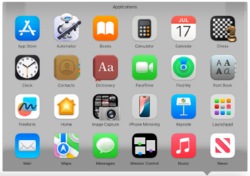
Stacks are a feature of the Dock in Apple's macOS that lets a folder placed in the Dock display its contents directly from the Dock. A folder in the Dock can be displayed either as a folder icon or as a “stack” of items, and its contents can be shown as a fan, grid, or list, with multiple sorting options.1
History
Stacks were introduced in Mac OS X Leopard (10.5) and were previewed at Apple's Worldwide Developers Conference (WWDC) in 2007. Apple demonstrated a default Downloads stack in the Dock to provide quick access to downloaded files.2
In the initial release of Leopard, Stacks supported fan and grid views. Mac OS X 10.5.2 added a list view and additional options such as displaying a Dock item as either a folder icon or a stack.3
Reviews of Mac OS X Snow Leopard (10.6) noted that Stacks in grid view became scrollable and could display the contents of subfolders within the stack interface, reducing the need to open a separate Finder window for navigation.4
Operation
A stack is created by dragging a folder to the right side of the Dock (the side that contains folders and the Trash). Selecting the stack displays the folder’s contents; users can open items directly, or choose an option to open the folder in Finder.1
Using the stack’s shortcut menu (for example, by Control-clicking the stack), users can change the stack’s view style (fan, grid, or list), choose a sort order, and switch the Dock item’s appearance between a folder icon and a stacked-items icon.1
Desktop Stacks
In macOS Mojave (10.14), Apple introduced a separate feature also called Stacks (often described as “Desktop Stacks”), which automatically groups files on the desktop into expandable piles to reduce clutter.5 Desktop stacks can be enabled from the Finder “View” menu when the desktop is active, and can group items by kind and other attributes.6
References
References
- "Use folders in the Dock on Mac". Apple Support. Apple Inc. Retrieved February 12, 2026.
- "WWDC News: iPhone, Leopard, Apple TV". TidBITS. June 11, 2007. Retrieved February 12, 2026.
- "Mac OS X 10.5.2 Update". Macworld. February 11, 2008. Retrieved February 12, 2026.
- "Review: Mac OS X Snow Leopard". PCWorld. August 26, 2009. Retrieved February 12, 2026.
- "Apple introduces macOS Mojave". Apple Newsroom. Apple Inc. June 4, 2018. Retrieved February 12, 2026.
- "Use desktop stacks on Mac". Apple Support. Apple Inc. Retrieved February 12, 2026.
External links
External links
- Use folders in the Dock on Mac (Apple Support)
- Use desktop stacks on Mac (Apple Support)