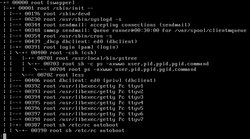
pstree is a Linux command that shows the running processes as a tree.123 It is used as a more visual alternative to the ps command. The root of the tree is either init or the process with the given pid. It can also be installed in other Unix systems.
In FreeBSD, a similar output is created using ps -d,4 in Linux ps axjf5 produces similar output.
Examples
pstree pid
user@host ~$ pstree 1066
rsyslogd─┬─{in:imjournal}
         └─{rs:main Q:Reg}
pstree username
user@host ~# pstree username
dbus-daemon───{dbus-daemon}

dbus-launch

bash───firefox─┬─6*[{Analysis Helper}]
               ├─{BgHangManager}
               ├─{Cache2 I/O}
               ├─{Compositor}
               ├─{GMPThread}
               ├─{Gecko_IOThread}
               ├─{Hang Monitor}
               ├─{ImageBridgeChil}
               ├─{ImageIO}
               ├─{JS Watchdog}
               ├─{Link Monitor}
               ├─{Socket Thread}
               ├─{SoftwareVsyncTh}
               ├─{StreamTrans #1}
               ├─{Timer}
               └─{gmain}
References
References
- "Pstree Command in Linux". linuxize.com. 2019-10-23. Retrieved 2024-12-27.
- James, Hayden (2023-12-11). "pstree command in Linux with examples". LinuxBlog.io. Retrieved 2024-12-27.
- "pstree Command in Linux with Examples". GeeksforGeeks. 2020-05-20. Retrieved 2024-12-27.
- "ps(1)". man.freebsd.org. Retrieved 2026-05-29.
- "Ps(1): Report snapshot of current processes - Linux man page".
External links
External links
- The psmisc package
- The pstree Command by The Linux Information Project (LINFO)
- Gnome Process Tree
- The portable version of pstree on GitHub
- – Linux General Commands Manual from ManKier.com
- – Solaris 11.4 User Commands Reference Manual