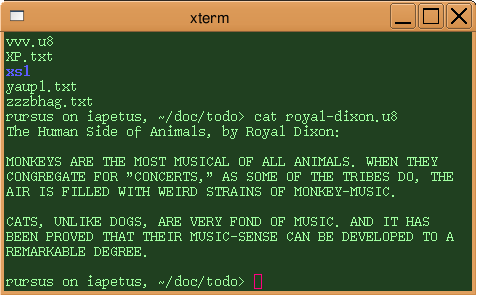
cat in an xterm window source ↗In computing, plain text is a loose term for unformatted text or nontextual data represented as text (e.g. file contents) using printable characters (for example letters, digits, symbols, spaces, tabs, line breaks) in a character encoding. In principle, plain text can be in any encoding, but today usually implies UTF-8.
Plain text is different from formatted text, where style information is included; from structured text, where structural parts of the document such as paragraphs, sections, and the like are identified; and from binary files in which some portions must be interpreted as binary objects (encoded integers, real numbers, images, etc.).
Plain text is often used as a counterpiece to "binary" files: those in which at least some parts of the file cannot be correctly interpreted as text. For example, a file or string consisting of "hello", following by 4 bytes that express a binary integer that is supposed to be evaluated in a CPU representation like little endian, is a binary file.
Text files that do not represent anything but text in a character encoding have no indicator of encoding, no magic number, no special marker at the beginning and no metadata marking them as text in most file systems. However their file-names are often marked with .txt at the end by Windows users and other operating sytems often assume unidentifiable files to be text. However there is the MIME type "text/plain" that is used for transfer over the internet or between software components.
Plain text and rich text
According to The Unicode Standard:1
- "Plain text is a pure sequence of character codes; plain Un-encoded text is therefore a sequence of Unicode character codes.
- In contrast, styled text, also known as rich text, is any text representation containing plain text plus added information such as a language identifier, font size, color, hypertext links, and so on.
- SGML, RTF, HTML, XML, and TeX are examples of rich text fully represented as plain text streams, interspersing plain text data with sequences of characters that represent the additional data structures."
According to other definitions, however, files that contain markup or other meta-data are generally considered plain text, so long as the markup is also in a directly human-readable form (as in HTML, XML, and so on). Thus, representations such as SGML, RTF, HTML, XML, wiki markup, and TeX, as well as nearly all programming language source code files, are considered plain text. The particular content is irrelevant to whether a file is plain text. For example, an SVG file can express drawings or even bitmapped graphics, but is still plain text.
The use of plain text rather than binary files enables files to survive much better "in the wild", in part by making them largely immune to computer architecture incompatibilities. For example, with all data encoded as UTF-8 text, all the problems of endianness can be avoided.
Usage
The purpose of using plain text today is primarily independence from programs that require their very own special encoding or formatting or file format. Plain text files can be opened, read, and edited with ubiquitous text editors and utilities.
A command-line interface allows people to give commands in plain text and get a response, also typically in plain text.
Many other computer programs are also capable of processing or creating plain text, such as countless programs in DOS, Windows, classic Mac OS, and Unix and its kin; as well as web browsers (a few browsers such as Lynx and the Line Mode Browser produce only plain text for display) and other e-text readers.
Plain text files are almost universal in programming; a source code file containing instructions in a programming language is almost always a plain text file. Plain text is also commonly used for configuration files, which are read for saved settings at the startup of a program.
Plain text is used for much e-mail.
A comment, a ".txt" file, or a TXT Record generally contains only plain text (without formatting) intended for humans to read.
Encoding
Character encodings
Before the early 1960s, computers were mainly used for number-crunching rather than for text, and memory was extremely expensive. Computers often allocated only 6 bits for each character, permitting only 64 characters—assigning codes for A-Z, a-z, and 0-9 would leave only 2 codes: nowhere near enough. Most computers opted not to support lower-case letters. Thus, early text projects such as Roberto Busa's Index Thomisticus, the Brown Corpus, and others had to resort to conventions such as keying an asterisk preceding letters actually intended to be upper-case.
Fred Brooks of IBM argued strongly for going to 8-bit bytes, because someday people might want to process text, and won. Although IBM used EBCDIC, most text from then on came to be encoded in ASCII, using values from 0 to 31 for (non-printing) control characters, and values from 32 to 127 for graphic characters such as letters, digits, and punctuation. Most machines stored characters in 8 bits rather than 7, ignoring the remaining bit or using it as a checksum.
When a document is received without any explicit indication of the character encoding, some applications use charset detection to attempt to guess what encoding was used.