| Freeseer | |
|---|---|
 | |
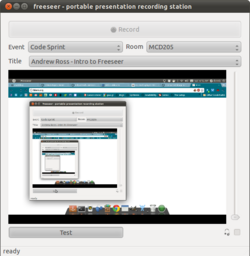 Freeseer 2.5.3 performing a test screencast on Ubuntu | |
| Original author | FOSSLC |
| Developers | Thanh Ha, Andrew Ross |
| Release | January 2010 (2010-01) |
| Stable release | 3.0.11  / 3 January 2014
 |
| Written in | Python |
| Operating system | Linux, Windows (additional software needed), OS X (not fully supported) |
| Platform | Qt4, GStreamer |
| Available in | English, German, French, Dutch, Chinese, Japanese |
| Type | Screencasting software |
| License | GPL-3.0-or-later2 |
| Website | freeseer |
| Repository | |
Freeseer (/ˈfriːsiːɑːr/) is a discontinued3 cross-platform screencasting application suite released as free and open-source software. Freeseer is a project of the Free and Open Source Software Learning Centre (FOSSLC), a not-for-profit organization.
Purpose
Its primary purpose is conference recording and has been used at conferences like OSGeo's FOSS4G, FSOSS, and more.4 The software renders videos in an Ogg format. Its video source options are USB (e.g. internal/external webcam) or desktop. Freeseer consists of three different dependent programs: a recording tool (which is the main tool), a configuration tool, and a talk-list editor.
History
Since 2008, FOSSLC has been recording open source events around the world. To reduce recording costs, gain more control over the recordings, and achieve a more portable recording solution, FOSSLC began investigating alternatives and in-house options.5
In 2009, Freeseer was developed to make recording video extremely easy.6 Its primary goal was to make recording large conferences with many talks possible on a frugal budget and ensure recordings are high quality. Freeseer began as a proof of concept when a command line hack using strictly open source components was used to record video from a vga2usb device and audio from a microphone.5
On May 28, 2022, the Freeseer project page on GitHub was archived, indicating no further development was to be expected.3
Features
- Configuration tool
- Video & audio recording
- Supports basic keyboard shortcuts
- Talk editor for managing talks to be recorded
- Uses a plug-in system so developers can easily add new features
- Video & audio streaming (RTMP streaming support and Justin.tv plug-in)
- Report editor for reporting issues with recorded talks
- Configuration profiles
- Multiple audio input
- YouTube uploader
References
References
- "Release 3.0.1". 3 January 2014. Retrieved 13 March 2018.
- "License". GitHub. Retrieved 16 October 2011.
- Freeseer/freeseer, FOSSLC's portable presentation-recording studio, 2023-10-24, retrieved 2024-01-11
- "About Freeseer (fosslc.org)". Archived from the original on 2011-08-30. Retrieved 2011-10-13.
- "Freeseer History (fosslc.org)". Archived from the original on 2012-02-13. Retrieved 2011-10-13.
- "FOSSLC History (fosslc.org)". Archived from the original on 2011-10-16. Retrieved 2011-10-13.