| find | |
|---|---|
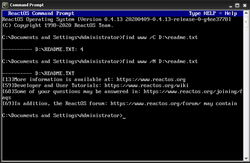 The ReactOS find command | |
| Developers | Microsoft, IBM, DR, Datalight, Novell, Jim Hall, ReactOS Contributors |
| Initial release | March 1983 (1983-03) |
| Written in | MS-DOS: x86 assembly language FreeDOS, ReactOS: C |
| Operating system | MS-DOS, PC DOS, FlexOS, SISNE plus, DR DOS, ROM-DOS, FreeDOS, 4690 OS, Windows, OS/2, eComStation, ArcaOS, ReactOS |
| Platform | Cross-platform |
| Type | Command |
| License | MS-DOS: MIT FreeDOS, ReactOS: GPLv2+ |
find is a shell command that searches for text in files and prints matching lines to standard output.12
The command is available in DOS,3 Digital Research FlexOS,4 IBM/Toshiba 4690 OS,5 IBM OS/2,6 Windows,7 and ReactOS.8 On MS-DOS, the command is available in versions 2 and later.9 DR DOS 6.010 and Datalight ROM-DOS11 include an implementation of the find command. The FreeDOS version was developed by Jim Hall and is licensed under the GPL.12
Notably, the same-named Unix-based command performs an entirely different function – searching the file system for matching files. This functionality is provided by the forfiles command in an environment with the command of this article. The Unix-based grep command provides a function similar to the command of this article.13
Use
The command syntax can be described as:
find [/v] [/c] [/n] [/i] "TEXT" [PATH...]
"TEXT"- Text to find. Must be enclosed in quotes. Notably, matching does not support wildcard characters.14
PATH- File system path to a file. If none specified, the command searches the text from standard input.
/v- Display lines not containing the text.
/c- Display only the count of matching lines.
/n- Display line numbers with matching lines.
/i- Ignore the case of characters when searching.
Examples
The following command searches file "Foo" for lines that contain "Important" and prints results to standard output.
C:\>find "Important" Foo
See also
See also
- List of DOS commands
- Regular expression – Sequence of characters that forms a search pattern
References
References
- Paterson, Tim (2013-12-19) [1983]. "Microsoft DOS V1.1 and V2.0: /msdos/v20source/FIND.ASM". Computer History Museum, Microsoft. Retrieved 2015-10-01.
- Shustek, Len (2014-03-24). "Microsoft MS-DOS early source code". Software Gems: The Computer History Museum Historical Source Code Series. Retrieved 2015-10-01.
- Jamsa, Kris A. (1993), DOS: The Complete Reference, Osborne McGraw-Hill, p. 206, ISBN 0078819040.
- "FlexOS User's Guide" (PDF). www.bitsavers.org. 1986. Archived from the original (PDF) on 2019-09-25. Retrieved 2020-09-14.
- "Users guide". archive.org. Retrieved 2020-09-14.
- "JaTomes Help - OS/2 Commands". Archived from the original on 2019-04-14. Retrieved 2019-07-20.
- "Find". Archived from the original on 2017-08-26. Retrieved 2017-08-26.
- "reactos/reactos". GitHub. 3 January 2022.
- Wolverton, Van (2003). Running MS-DOS Version 6.22 (20th Anniversary Edition), 6th Revised edition. Microsoft Press. ISBN 0-7356-1812-7.
- DR DOS 6.0 User Guide Optimisation and Configuration Tips
- "Datalight ROM-DOS User's Guide" (PDF). www.datalight.com.
- "ibiblio.org FreeDOS Package -- find (FreeDOS Base)". www.ibiblio.org.
- "Equivalent of UNIX Grep command in Dos/Windows". January 26, 2009.
- "Find - Search for text - Windows CMD - SS64.com". ss64.com.
Further reading
Further reading
- Cooper, Jim (2001). Special Edition Using MS-DOS 6.22, Third Edition. Que Publishing. ISBN 978-0789725738.
- Kathy Ivens; Brian Proffit (1993). OS/2 Inside & Out. Osborne McGraw-Hill. ISBN 978-0078818714.
- Frisch, Æleen (2001). Windows 2000 Commands Pocket Reference. O'Reilly. ISBN 978-0-596-00148-3.