| Cryptomatte | |
|---|---|
 | |
| Original authors | Jonah Friedman Andy Jones |
| Developer | Psyop |
| Initial release | 10 July 2016 (2016-07-10) |
| Stable release | 1.4
/ 3 May 2021 (2021-05-03) |
| Preview release | 1.5.0.beta
/ 10 March 2021 (2021-03-10) |
| Written in | Python, Lua |
| License | BSD 3-clause license |
| Website | github |
| Repository | github |


Bottom: The same scene as cryptomatte image view
Cryptomatte is a piece of open-source software created by Jonah Friedman and Andy Jones at Psyop. It is also used synonymously for the specific style of image created by the software or other software working alike.
Cryptomatte is a quasi-standard in the industry, because of its ubiquity, integration into popular 3D graphics software, and ease of use.
Render processing
The program itself creates an ID matte of a scene that can be used to create for example image masks for single or multiple objects in the scene. The ID matte has a very distinctive look and itself is sometimes referred to as cryptomatte. These cryptomatte images are in general very colourful assigning each object or material a different random colour. The program creates mattes that support motion blur, transparency and depth of field using data that is already available at render time.1
Supported render engines
Cryptomatte images can be created by several 3D graphic programs like Blender,2 Autodesk Maya,3 Autodesk 3ds Max4 or Houdini5 and are usually exported using the OpenEXR file format.
Whether a program is able to generate a cryptomatte or not is determined by the render engine being used. If a program supports more than one render engine it is possible that it can generate cryptomatte images with one engine while being unable to do so with the other one. Blender, for example, had no option to create a cryptomatte image before version 2.80.6 With version 2.80, only the "Cycles" path-tracing render engine supported creating a cryptomatte whereas "Eevee", the newly added real-time render engine, did not. The support to create cryptomatte images was added to Eevee with version 2.92 that was published on February 25, 20217 one and a half years after Eevee was first published.8
The following render engines are known to support creating cryptomatte images:
| Render engine name | Shipped with | Added with version |
|---|---|---|
| Arnold910 | Autodesk 3ds Max Autodesk Maya |
Arnold 5.2 |
| Cycles6 | Blender | Blender 2.80 |
| Eevee8 | Blender | Blender 2.92 |
| Mantra11 | Houdini | Houdini 16.5 |
| Karma12 | Houdini | Houdini 18.5 |
| Modo renderer / mPath13 | Modo14 | Modo 14.2 |
| Redshift15 | Cinema 4D (CPU-only) | Redshift 2.6.11 |
| 3Delight16 | Katana | 3Delight 1.7.3216 |
| Unreal Engine (Movie Render Queue)17 | Unreal Engine | 4.26 |
| Radeon ProRender18 | Radeon ProRender 3.1 | |
| Octane Render19 | ||
| RenderMan20 | ||
| V-Ray21 |
Supported compositing software
| Compositing software name | Added with version |
|---|---|
| Autodesk Flame | 202022 |
| After Effects | 17.023 |
| Nuke | 13.024 |
| Blackmagic Fusion | 20 |
| Blender (Compositing Nodes) | 2.8 |
| Houdini (COP) | 16.511 |
| V-Ray (V-Ray Frame Buffer) | 5 Update 125 |
| Adobe Photoshop | Exr-IO 2.026 |
| Gaffer | 0.61.2.027 |
Workflow example
In a 3D scene a cryptomatte image can be created that assigns a unique ID to each object. The objects usually also have distinct colours that make a scene with many objects very colourful. The ID matte can be used to pick one or more objects in a scene. The ID matte can either be exported or it can be used by the 3D software itself for compositing.
An example workflow would be to use the cryptomatte image to generate a mask that itself is used to limit an effect to only a certain part of the image. It can thereby be used to quickly create masks without the need of re-rendering a whole scene.
The example workflow for images:
-
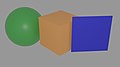 A simple rendered 3D scene
 -
 The scene's cryptomatte view as image
 -
 A mask based on the cryptomatte image with the cube as selected object
The same workflow for video files:
-
A simple rendered 3D scene
-
The scene's cryptomatte view as image
-
A mask based on the cryptomatte image with the cube as selected object
-
The cryptomatte (top), rendered (middle) and mask view (bottom) combined
The masks in the examples can be used to limit a visual effect so that only the cube in the middle is affected.
Licensing
The developers published the program's source code and licensed it under the BSD 3-clause license "to turn it into an ecosystem around an open standard". Their goal was "to see a diverse ecosystem of renderers that can create Cryptomatte images and plugins for compositing applications to decode them".1
References
References
- Cryptomatte on github.com
- Cryptomatte Node on docs.blender.org
- Cryptomatte in Maya on rmanwiki.pixar.com
- Cryptomatte on docs.arnoldrenderer.com
- Cryptomatte on sidefx.com
- Blender 2.80 Release Notes: Cycles on wiki.blender.org
- index of blender 2.92 release on download.blender.org
- Blender 2.92 Release Notes: EEVEE on wiki.blender.org
- Cryptomatte Shader docs.arnoldrenderer.com
- Solid Angle ships Arnold 5.2.1. CG Channel. October 23, 2018
- What’s new in Houdini 16.5 Side Effects Software
- Karma Renderer FAQs. SideFX
- Foundry ships Modo 14.2. CG Channel. November 13, 2020
- Foundry announces strategic decision to wind down development of Modo. Foundry.com. November 7, 2024
- Redshift Version 2.6.11リリースノート (in Japanese). Born Digital. June 12, 2018
- Changelog - 3DELIGHT. DNA Research
- Movie Render Queue Render Passes. Epic Games
- AMD ships Radeon ProRender 3.1 for Blender and Maya. CG Channel. April 1, 2021.
- CRYPTOMATTE on aoktar.com
- PxrCryptomatte on rmanwiki.pixar.com
- Using the Cryptomatte In V-Ray for 3ds Max on tutorials.cgrecord.net
- Autodesk ships Flame 2020. CG Channel. April 16, 2019
- Adobe ships After Effects 17.0. CG Channel. November 4, 2019
- Foundry ships Nuke, NukeX, Nuke Studio & Nuke Indie 13.0. CG Channel. March 17, 2021.
- Chaos releases V-Ray 5 for 3ds Max Update 1. CG Channel. February 24, 2021
- New: Exr-io 2.00 with cryptomatte support. Exr-IO is a third-party plugin
- "Release Gaffer 0.61.2.0 · GafferHQ/gaffer". GitHub. Retrieved 2023-07-21.