| comp | |
|---|---|
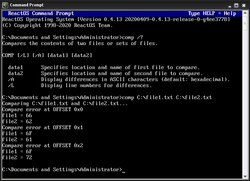 The ReactOS comp command | |
| Developers | DEC, IBM, Microsoft, Digital Research, Novell, Paul Vojta, ReactOS Contributors |
| Initial release | August 1981 (1981-08) |
| Operating system | OS/8, PC DOS, MS-DOS, FlexOS, SISNE plus, OS/2, eComStation, ArcaOS, Windows, DR DOS, FreeDOS, ReactOS |
| Platform | Cross-platform |
| Type | Command |
| License | FreeDOS: MIT ReactOS: GNU GPL 2 |
In computing, comp is a command used on DEC OS/8,1 DOS,2 DR FlexOS,3 IBM OS/2,4 Microsoft Windows5 and related computer operating systems such as ReactOS. It is used to perform comparisons of multiple computer files to show the differences between them.6
History

COMP.COM (among other commands) in IBM PC DOS 1.0. source ↗In DOS, the comp command first appeared in PC DOS 1.07 and has been included in most versions of MS-DOS and PC DOS. A newer command, fc was added in DOS 3.3 which allows for line comparisons in addition to binary comparisons. DR DOS 6.0 also includes an implementation of the comp command.8
The FreeDOS version was developed by Paul Vojta and is licensed under the MIT License.9 Ged Murphy developed the ReactOS version. It is licensed under the GNU GPL 2.10
The command is also available in the EFI shell.11
Syntax
comp [<Data1>] [<Data2>] [/d] [/a] [/l] [/n=<Number>] [/c]
Parameters
<Data1>– Location and name of the first file or set of files<Data2>– Location and name of the second file or set of files/d– Display differences in decimal format (Default is hexadecimal)/a– Display differences as characters/l– Display the number of the line, instead of the byte offset/n=<Number>– Compare only the specified number of lines for each file/c– Perform a non case-sensitive comparison/off[line]– Process files with the offline attribute set/?– Display Help
References
References
- "Concise Command Language" (CCL)."OS/8 Handbook" (PDF). April 1974. Retrieved 28 November 2017.
- Jamsa, Kris A. (1993), DOS: The Complete Reference, Osborne McGraw-Hill, p. 206, ISBN 0078819040.
- http://www.bitsavers.org/pdf/digitalResearch/flexos/1073-2003_FlexOS_Users_Guide_V1.3_Nov86.pdf Archived 2019-09-25 at the Wayback Machine
- "OS/2 Commands". www.jatomes.com. Archived from the original on 2019-04-14. Retrieved 2019-07-20.
- "Comp".
- Wolverton, Van (2003). Running MS-DOS Version 6.22 (20th Anniversary Edition), 6th Revised edition. Microsoft Press. ISBN 0-7356-1812-7.
- http://www.bitsavers.org/pdf/ibm/pc/dos/6172220_DOS_1.0_Jan82.pdf
- "DR DOS 6.0 User Guide Optimisation and Configuration Tips" (PDF). Archived from the original (PDF) on 2019-09-30. Retrieved 2019-08-13.
- "FreeDOS 1.2 Updates Package - comp (FreeDOS Base)". Ibiblio.org. 2006-10-21. Retrieved 2022-09-04.
- "Reactos/Reactos". GitHub. 3 January 2022.
- "EFI Shells and Scripting". Intel. Archived from the original on 2009-01-30. Retrieved 2013-09-25.
- MS-DOS and Windows command line comp command
Further reading
Further reading
- Cooper, Jim (2001). Special Edition Using MS-DOS 6.22, Third Edition. Que Publishing. ISBN 978-0789725738.
- Dyson, Peter (1995). Mastering OS/2 Warp. Sybex. ISBN 978-0782116632.
- Stanek, William R. (2008). Windows Command-Line Administrator's Pocket Consultant, 2nd Edition. Microsoft Press. ISBN 978-0735622623.