| w3m | |
|---|---|
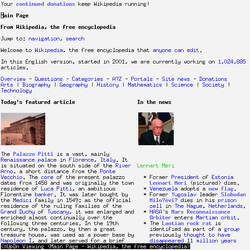 w3m running in an xterm displaying the Wikipedia main page. | |
| Original author | Akinori Ito |
| Developers | Fumitoshi UKAI, Tatsuya Kinoshita, Rene Kita, et al. |
| Initial release | 1995 |
| Stable release | 0.5.61  / 23 January 2026
 |
| Written in | C |
| Operating system | OS/2,23 Unix & Unix-like (Solaris, SunOS, HP-UX, Linux, FreeBSD and EWS-UX (EWS-4800),4 Windows (with Cygwin), macOS (with Homebrew) |
| Available in | English and Japanese |
| Type | Web browser, Terminal pager |
| License | MIT license |
| Website | git |
| Repository | |
w3m is a free and open source text-based web browser licensed under the MIT license. It differs from other early text-based browsers by supporting elements such as tables, frames, and, in some distributions, images.56
History
The name "w3m" stands for "WWW wo miru (WWWを見る)", which is Japanese for "to see the WWW", and where "W3" is a numeronym of "WWW".7 The original project is no longer active. A different developer, Tatsuya Kinoshita, was maintaining a fork until early 2024.8 Kinoshita left the project after a few months.9 A new fork was created as a result,10 which continues to be developed as of 2026.11
Functions
w3m runs in terminal emulator programs such as xterm and GNOME Terminal.12 The browser has tabbed browsing, right click menus, and image support,12 along with support for tables and frames. It also functions as a terminal pager.5 It can be navigated solely using the keyboard or with the mouse. There are two different display modes, one with colors and one that is monochrome.13
w3m can be used within Emacs.14
Some distributions require the installation of a second package, w3m-img, to render images using w3m.15
References
References
- "NEWS".
- TOKORO, Kyosuke. "w3m 0.2.1–3 for OS/2 WARP". Archived from the original on 4 May 2001. Retrieved 16 August 2010.
- Watson, Dave (September 2001). "Text-Mode Web Browsers for OS/2". The Southern California OS/2 User Group. Retrieved 16 August 2010.
- w3m manual page
- Rutland, David (2 November 2022). "The 3 Best Terminal-Based Web Browsers for Linux". MUO. Retrieved 3 May 2024.
- Negus, Christopher (28 January 2005). Linux Bible. John Wiley & Sons. ISBN 978-0-7645-8974-4.
- "W3M FAQ". Retrieved 8 April 2022.
- Das, Ankush (20 October 2020). "Best Terminal-based Web Browsers for Linux Users". It's FOSS. Retrieved 3 May 2024.
- Kita, Rene (1 August 2024). "w3m Maintenance". GitHub. Retrieved 1 August 2025.
- "w3m: Fork of Debian's w3m". SourceHut. Retrieved 1 August 2025.
- "~rkta/w3m: master log". SourceHut. Retrieved 25 May 2026.
- Hoffman, Chris (23 January 2012). "How to Browse From the Linux Terminal With W3M". How-To Geek. Retrieved 3 May 2024.
- "How to use the W3M text-based web browser on Linux". AddictiveTips. 17 April 2021. Retrieved 3 May 2024.
- "EmacsWiki: w3m". www.emacswiki.org. Retrieved 3 May 2024.
- Rankin, Kyle (2006). Linux Multimedia Hacks: Tips & Tools for Taming Images, Audio, and Video. O'Reilly Media, Inc. ISBN 978-0-596-10076-6.