| Semaphore | |
|---|---|
 | |
 | |
| Developer | Denis Gukov |
| Release | 25 August 2021 (2021-08-25) |
| Stable release | |
| Written in | Go, JavaScript |
| Operating system | Cross-platform |
| Platform | x86-64, ARM |
| Predecessor | Ansible Semaphore |
| Type | Continuous integration |
| License | MIT licence |
| Website | semaphoreui |
| Repository | github |

Semaphore is a self-hosted continuous automation and deployment tool used for running automation tasks hosted on GitHub, BitBucket or other git hosting.
While open source projects can use Semaphore UI for free in its full capacity, the Community edition is free and open source, with paid Pro and Enterprise editions available from $20 per month.
One of Semaphore’s features is native Docker support, which enables testing and deploying Docker-based applications. Semaphore UI also offers distributed runners, a feature that reduces the duration of running a task by distributing jobs across multiple machines.
Features
Semaphore UI supports the following automation tools: Ansible, Terraform, OpenTofu, PowerShell and shell scripts. Tasks written for other tools demand manual configuration.
Some of the supported secret backends include: HashiCorp Vault2, OpenBao, AWS Secrets Manager and Azure Key Vault.
Semaphore supports authentication through LDAP, Active Directory and OpenID Connect (OIDC) providers such as Azure Entra ID, Okta and Keycloak, allowing it to integrate with existing identity providers for single sign-on and centralized user management.
Semaphore UI supports Linux and Windows.
Operation

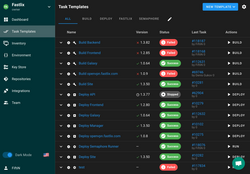
Once a project and its source repository have been configured, Semaphore UI organizes work into templates that define which playbook, script or configuration to run, along with the required inventory, environment and credentials. When a template is launched, the corresponding task is queued and executed by a runner. The results of the performed tasks are highlighted red (failed) or green (success), and the full output log is available for inspection. If a task fails, the user can review the log, adjust the configuration and run the task again.