| LazPaint | |
|---|---|
 | |
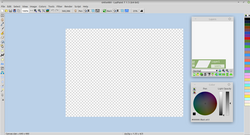 The default window of LazPaint 7.1.5 64-bit, running on Linux Mint 20 Xfce | |
| Original author | circular |
| Developer | circular helped by Lazarus community |
| Release | February 2011 (2011-02) |
| Stable release | 7.31  / 24 May 2025
 |
| Written in | Free Pascal |
| Operating system | Windows XP and later, Linux, OS X2 |
| Platform | native |
| Size | 6.78 MB download |
| Available in | Arabic, Bulgarian, Chinese, Czech, Dutch, German, English, French, Finnish, Italian, Japanese, Kabyle, Latvian, Polish, Portuguese, Russian, Spanish, Swedish34 |
| Type | Raster graphics editor |
| License | GPL-3.0-only |
| Website | lazpaint |
| Repository | |
LazPaint is a free and open-source cross-platformnb 1 lightweight image editor with raster and vectorial layers created with Lazarus. The software aims at being simpler than GIMP,5 is an alternative to Paint.NET and is also similar to Paintbrush.67
Rendering is done with antialiasing and gamma correction.8 It can read/write usual image formats9 and interoperate with other layered editors via OpenRaster format.1011 It also imports Paint.NET files (with their layer structure) and Photoshop files (as flattened images).912 Also, it can import 3D objects in Wavefront (.obj) format. There are complex selection functions, various filters13 and rendering of textures.
Colorspace
Colors are stored in sRGB colorspace but drawing functions take into account gamma correction. There are many color manipulation functions such as shifting colors and colorizing.1413 Since version 6, there is a curve adjustments function on RGBA channels and according to a corrected HSL colorspace.15 This correction takes into account the gamma factor and also perceived lightness according to the hue.
Vector shapes
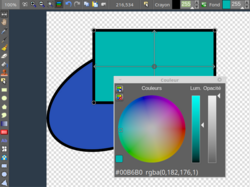
Since version 7, shapes are stored with vectorial information. Thus they are editable after they have been drawn and are rendered again in case of layer transform. Layers are converted when needed to raster or vector. If a tool like the pen is applied, the layer is rasterized and vectorial information becomes unavailable.
Filling can be a solid color, a gradient or a texture. It can apply to simple shapes, complex curves, text and shaded shapes.
Releases
| Version | Release date1617 | Significant changes |
|---|---|---|
| 1 | 6 February 2011 | First release18 |
| 2 | 21 February 2011 | Add render water and Perlin noise, magic wand, polygonal selection, command line19 |
| 3 | 2 April 2011 | Render textures, twirl filter, resample filters20 |
| 4.1 | 20 May 2011 | Several spline styles, better clipboard transparency21 |
| 4.4 | 2 April 2011 | High DPI support, pixelate filter, text tool with outline and shadow22 |
| 4.7 | 11 December 2011 | Language choice, Phong shaded text, portable version23 |
| 4.8 | 19 August 2012 | Add texture mapping tool, import 3D objects, corrected HSL shift colors, selection mask edition24 |
| 5.0 | 18 February 2013 | Add support for raster layers, load Paint.NET layered images, read/write OpenRaster images25 |
| 5.5 | 4 March 2013 | Add Phong filter, filter function, blur computed in thread26 |
| 5.6 | 23 March 2013 | Add Easy Bézier curves27 |
| 6.0 | 31 July 2014 | Add image list, image browser, color curves adjustment, noise filter, posterize filter, print dialog, read flat PSD format, read/write TGA and TIFF28 |
| 6.4.1 | 28 May 2016 | Added brush and clone tool, palette, docking of toolbox, rain rendering, when saving show preview and choice of bit depth29 |
| 7.0 beta | 17 August 2019 | Vector layers, edit shape tool, shape alignment, wave displacement filter, non-lossy transform of layers, zoom layer tool, edit frame of ICO / CUR / GIF, Lab colorspace support when reading TIFF30 |
| 7.0.7 | 15 October 2019 | Optimize saving of LZP images, add entry to multi-image files (GIF / TIFF), merge vector layers, right-click to rotate/shear shape, improvement of polygon editing31 |
| 7.1.3 | 18 May 2020 | Various bug fixes32 |
| 7.1.4 | 7 October 2020 | Optimize for MacOS with Retina display, magic wand progressive fill, optimize multiline text, show printed page count, Shift-Click to select or clone from other layers33 |
| 7.1.5 | 19 October 2020 | Image browser improvements, scaling fixes34 |
| 7.1.6 | 2 December 2020 | HSL blend modes, layered SVG read/write, detect dark theme, better Retina support, Qt5 support on Linux35 |
References
References
- "Release 7.3". 24 May 2025. Retrieved 27 May 2025.
- "LazPaint is an open source raster graphics editor for Windows, macOS and Linux". ghacks.net. 4 November 2019. Retrieved 28 November 2020.
- "Lazpaint development thread". Archived from the original on 2020-07-05. Retrieved 2014-08-17.
- LazPaint i18n directory
- "Review on about.com". Archived from the original on 2016-08-03. Retrieved 2014-08-17.
- Das, Ankush (17 November 2020). "LazPaint: A Free & Open Source Paint.NET Alternative". It's FOSS. Archived from the original on 28 November 2020. Retrieved 28 November 2020.
- "LazPaint – Raster Image Editor Similar to Paint.Net / PaintBrush". UbuntuHandbook. 9 October 2020. Retrieved 28 November 2020.
- gyptis.net apps of January 2014 Archived 2014-08-19 at the Wayback Machine
- LazPaint File wiki Archived 2014-08-19 at the Wayback Machine; flat images: Bmp, Gif, Ico/Cur, Jpeg, Pcx, Png, Svg, Tga, Tiff, WebP, Xpm, Xwd; layered images: Lzp, Ora, Pdn, oXo, Psd; raw images: dng, cr2, nef, arw...
- Loading OpenRaster in LazPaint Archived 2020-06-12 at the Wayback Machine (video)
- Saving OpenRaster for Krita Archived 2020-06-12 at the Wayback Machine (video)
- "Video of importation of PSD file". Archived from the original on 2015-12-17. Retrieved 2014-08-17.
- "LazPaint review on rgdot.com". Archived from the original on 2014-08-19. Retrieved 2014-08-19.
- "Mrflock: come cambiare i colori di una foto". Archived from the original on 2014-08-19. Retrieved 2014-08-19.
- Review on chip.de
- "LazPaint". Sourceforge. Retrieved 28 November 2020.
- "LazPaint". Uptodown. Archived from the original on 20 October 2021. Retrieved 28 November 2020.
- "LazPaint 1 Release". Lazarus forum. Archived from the original on 26 January 2021. Retrieved 4 December 2020.
- "LazPaint 2.2 Release". Lazarus forum. Retrieved 4 December 2020.
- "LazPaint 3.0 Release". Lazarus forum. Retrieved 4 December 2020.
- "LazPaint 4.1 Release". Lazarus forum. Archived from the original on 26 January 2021. Retrieved 4 December 2020.
- "LazPaint 4.4 Release". Lazarus forum. Retrieved 4 December 2020.
- "LazPaint 4.7 Release". Lazarus forum. Retrieved 4 December 2020.
- "LazPaint 4.8 Release". Lazarus forum. Retrieved 4 December 2020.
- "LazPaint 5.0 Release". Lazarus forum. Archived from the original on 5 March 2022. Retrieved 4 December 2020.
- "LazPaint 5.5 Release". Lazarus forum. Retrieved 4 December 2020.
- "LazPaint 5.6 Release". Lazarus forum. Retrieved 4 December 2020.
- "LazPaint 6.0 Release". Lazarus forum. Retrieved 4 December 2020.
- "LazPaint 6.4.1 Releases". Github. Retrieved 4 December 2020.
- "LazPaint 7.0.1 Beta". Github. Retrieved 23 December 2020.
- "LazPaint 7.0.7 Releases". Github. Retrieved 23 December 2020.
- "LazPaint 7.1.3 Releases". Github. Archived from the original on 5 August 2020. Retrieved 23 December 2020.
- "LazPaint 7.1.4 Releases". Github. Archived from the original on 2 May 2024. Retrieved 23 December 2020.
- "LazPaint 7.1.5 Releases". Github. Archived from the original on 22 July 2022. Retrieved 28 November 2020.
- "LazPaint 7.1.6 Releases". Github. Archived from the original on 25 February 2021. Retrieved 3 December 2020.
External links
External links
- LazPaint on SourceForge
- LazPaint on Facebook
- 2011 poll on linuxquestions.org (7th place out of 13 linux graphics application)
- Chip magazine in Russian mentioning version 6.0